Simple Continuous Delivery for dbt Cloud with GitHub Actions
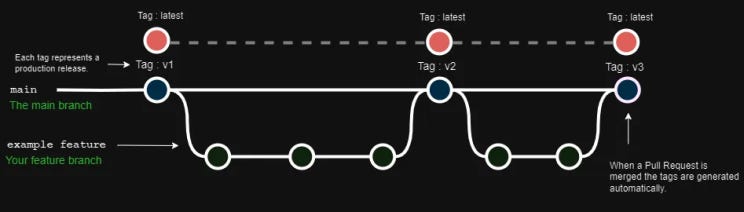
As more data teams move into analytics engineering with tools like dbt, the developer experience matters more than ever. Analytics engineering has brought a lot of DevOps thinking from the software world — which is mostly good. But working with data is different to traditional software development, and the principles that work best are the ones that don’t overcomplicate things.
The design I’m going to walk through is the sweet spot between the rigidity of software DevOps and the ad hoc nature of data analytics. It’s built around one principle: KISS.
The Branching Strategy
Keep it simple. One default branch (main). Developers branch off it, merge back to it. That’s it.
The version numbering is equally simple — sequential integers (v1, v2, v3). Two reasons: it makes automated versioning trivial, and if most of your users aren’t used to semantic versioning, don’t make that another thing to learn. Semantic versioning can be a phase 2 upgrade once the team is comfortable with the flow.
The lower the barrier to entry, the less developer anxiety. That’s the whole point.
How Continuous Delivery Works
On every merge to main, a GitHub Action automatically:
- Creates a versioned tag (e.g.
v42) for the commit - Updates a
latesttag to point to that same commit
Your dbt Cloud production environment always pulls from latest. Your dev/preproduction environment always pulls from main.
That’s the whole model. Production only ever runs explicitly tagged releases. Development always has the freshest code.
Here’s the GitHub Actions workflow:
name: Continuous Delivery

on:
  push:
    branches:
    - main

jobs:
  create-version-tag:
    runs-on: ubuntu-latest
    steps:
      - uses: actions/checkout@v2
        with:
          fetch-depth: 0
      - name: Create build number tag.
        run: |
          git config user.name "GitHub Actions Bot"
          git config user.email "<>"
          git checkout main
          git tag -fa "v${{github.run_number}}" -m "Build ${{github.run_number}}"
          git push origin main --tags --force

  update-latest-tag:
    needs: create-version-tag # Only create latest once version tag has been created.
    runs-on: ubuntu-latest
    steps:
      - uses: actions/checkout@v2
        with:
          fetch-depth: 0
      - name: Create OR Replace "latest" tag.
        run: |
          git config user.name "GitHub Actions Bot"
          git config user.email "<>"
          git checkout v${{github.run_number}}
          git tag -fa "latest" -m "Latest and Greatest"
          git push origin main --tags --force
Setting Up dbt Cloud
You need two environments in dbt Cloud.
Development / Preproduction
Set the git branch to your default branch (main). This environment pulls from the HEAD of main on every run — use it for preproduction tests or as a developer sandbox.
Production
Here’s where it comes together. Instead of pointing at a branch, set the git branch field to latest. dbt Cloud will pull the code associated with that tag whenever a job runs in this environment.
Every push to main moves latest forward automatically. Production always runs the most recently released version. Developers always see the latest work in their sandbox.
Why This Works
The design is intentionally boring. There’s no complex branching hierarchy to explain, no semantic versioning debates, no manual tagging process. A developer merges to main, the action runs, production gets the update.
The simplicity isn’t laziness — it’s the feature. The teams I’ve seen struggle most with data DevOps aren’t struggling because the tools are bad. They’re struggling because the process is more complicated than the problem requires.
Start here. Add complexity only when you have a specific reason to.
In the next article, we’ll expand on this and add rollback support.